 Keepable
Fọ́ọ̀mù wà níwájú rẹ, kì í ṣe fáìlì ímeèlì
Dáhùn nínú ohun èlò, ààyè kan lẹ́yìn òmíràn, ó sì ń pa mọ́ bí o ṣe ń lọ. Kò nílò gbígba PDF sílẹ̀, fífi kún PDF lórí fóònù, títẹ̀ jáde kí o kọ̀wé tó sì yà fọ́tò padà.
Àjọ lè béèrè kí o fọwọ́sí fọ́ọ̀mù tàbí dá ìwé padà. Ìdáhùn rẹ ń pa mọ́ bí o ṣe ń ṣe, fáìlì sì wà pẹ̀lú ìbéèrè; àjọ kò gba ohunkóhun títí o fi yẹ̀ ẹ́ wò tó sì yàn láti fi ránṣẹ́.
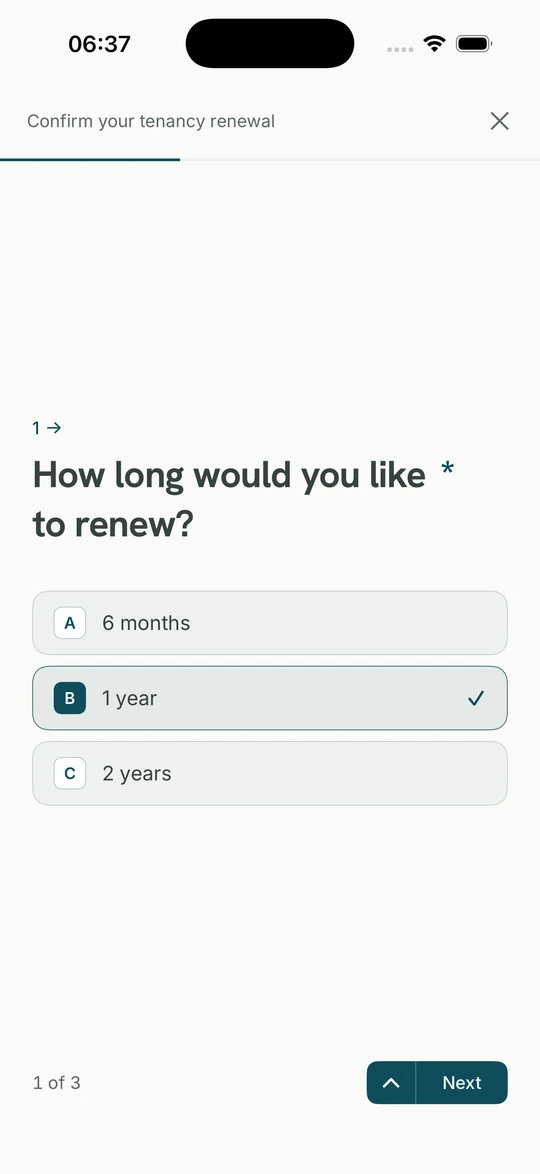
Dáhùn nínú ohun èlò, ààyè kan lẹ́yìn òmíràn, ó sì ń pa mọ́ bí o ṣe ń lọ. Kò nílò gbígba PDF sílẹ̀, fífi kún PDF lórí fóònù, títẹ̀ jáde kí o kọ̀wé tó sì yà fọ́tò padà.
Tí a bá béèrè ìwé ìṣírò tàbí ìwé owó òṣù, fi èyí tó ti wà nínú Keepable rẹ ránṣẹ́. Ó lọ gẹ́gẹ́ bí ojúlówó, kì í ṣe fọ́tò ojú ẹ̀rọ.
Ìdáhùn àti fáìlì rẹ ń padà pẹ̀lú èdìdì àti àkókò. Tí ẹnikẹ́ni bá sọ pé ohun mìíràn ni o fi ránṣẹ́ tàbí ó pẹ́, ìdáhùn wà nínú àkọsílẹ̀, kì í ṣe ìrántí rẹ nìkan.
Ìdáhùn tí a tẹ̀, ọjọ́, àṣàyàn, ìbuwọ́lu tàbí fáìlì tó 20 MB.
Ìdáhùn àti fáìlì rẹ pẹ̀lú èdìdì àti àkókò fífi ránṣẹ́.
Ìrìn sí ẹ̀ka, ibi ìtẹ̀wé àti ọjọ́ iṣẹ́ mẹ́rìnlá.
Ìdáhùn kúkúrú tàbí gígùn, yan ọ̀kan tàbí púpọ̀, nọ́ńbà, ọjọ́ àti fáìlì. Ìbéèrè lè tẹ̀lé ìdáhùn rẹ; tí o bá ń yá ilé, kò béèrè mẹ́rin nípa awin ilé. Ìbuwọ́lu tí olùránṣẹ́ nílò wà lórí ìwé gan-an, kì í ṣe àpótí tí o tẹ orúkọ sí.
PDF, fọ́tò tàbí ìwé tí a sikánì tó 20 MB kọ̀ọ̀kan; olùránṣẹ́ lè fi ààlà sí irú tí ó lè lò. Tí ohun náà bá ti wà nínú Keepable rẹ, fi ojúlówó tí ilé ìfowópamọ́ rán ránṣẹ́, kì í ṣe fọ́tò ojú ẹ̀rọ.
Bẹ́ẹ̀ ni. Ìdáhùn ń pa mọ́ bí o ṣe ń ṣe, kò sì sí ohun tó dé olùránṣẹ́ títí o fi ránṣẹ́. O lè dúró, wá àlàyé kí o padà.
Rárá. O lè fi ìbéèrè kan tàbí gbogbo rẹ̀ sílẹ̀ láìdáhùn. Tí a bá béèrè ohun tí o kò fẹ́ fún wọn, o lè yan láti má fi ránṣẹ́. Keepable kò dáhùn tàbí fọwọ́sí ohun kankan fún ọ.
A ń bójú tó ìbéèrè tó gba wọn lọ́nà pàtó: ìpamọ́ sínú kóòdù, a kò fi sínú ìwá, a sì bo ọ ní ẹ̀gbẹ́ olùránṣẹ́. Tí ẹni kan bá ṣí i láti rí i, ìgbésẹ̀ pàtó ni a kọ sílẹ̀.
Kò ní ẹ̀rí tó dájú. Ohun tí o dá padà ní èdìdì pẹ̀lú àkókò fífi ránṣẹ́; a lè jẹ́rìí pé fáìlì tí wọ́n ní ni èyí tí o rán, àkókò sì wà nínú àkọsílẹ̀, kì í ṣe ìrántí ẹnikẹ́ni.
Fọ́ọ̀mù olùránṣẹ́ ni èyí. Keepable kò yan ohun tí wọ́n béèrè, kò lè mú kí wọ́n kà á kíákíá, kò sì dáhùn fún ọ. Tí wọ́n bá béèrè ohun tí o kò fẹ́ fún wọn, o lè fi sílẹ̀ láìdáhùn. Kò sí ohun tó lọ títí o fi ránṣẹ́.