 Keepable
Fom yana gabanku, ba abin haɗawa a imel ba
Ku amsa a manhaja, filin ɗaya bayan ɗaya, yana ajiyewa yayin da kuke yi. Ba sai an sauke PDF, cika shi a waya, buga shi a rubuta sannan ɗaukar hoto ba.
Ƙungiya za ta nemi ku cika fom ko maida takarda. Amsoshinku suna ajiyewa yayin cikawa, fayiloli suna tare da buƙatar, kuma ƙungiya ba ta karɓar komai har kun duba kun zaɓi aikawa.
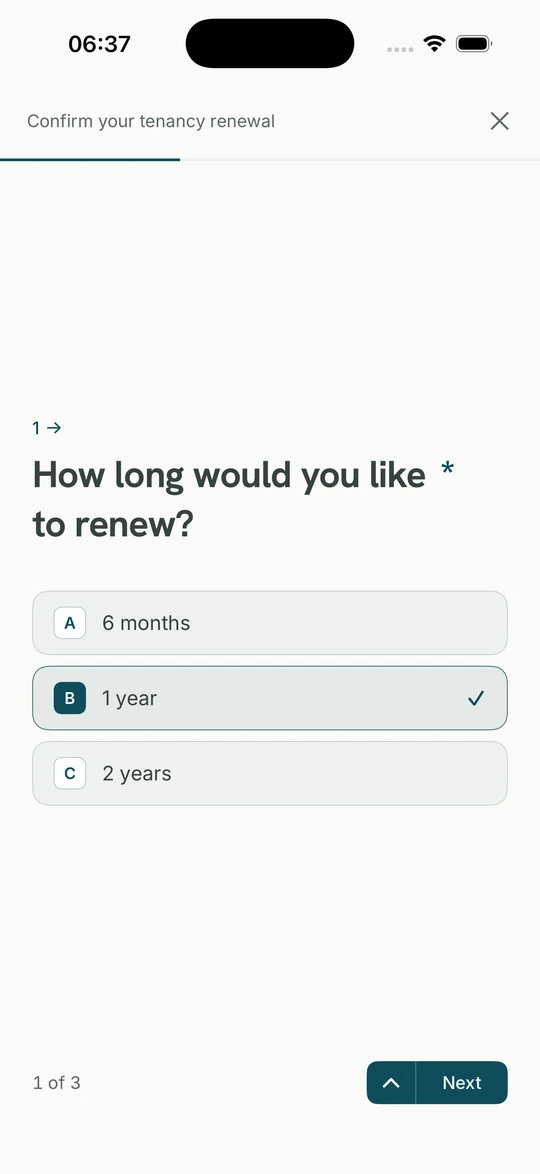
Ku amsa a manhaja, filin ɗaya bayan ɗaya, yana ajiyewa yayin da kuke yi. Ba sai an sauke PDF, cika shi a waya, buga shi a rubuta sannan ɗaukar hoto ba.
Idan an nemi bayanin lissafi ko takardar albashi, aika wadda ke Keepable ɗinku. Tana zuwa ainihinta, ba hoton allo ba.
Amsoshi da fayilolinku suna komawa da hatimi da lokaci. Idan wani ya ce kun aika wani abu dabam ko a makare, amsar tana a bayanin, ba a ƙwaƙwalwarku kaɗai ba.
Amsar da aka rubuta, kwanan wata, zaɓi, sa hannu ko fayil har 20 MB.
Amsoshi da fayilolinku da hatimi da lokacin aikawa.
Zuwa reshe, cibiyar kasuwanci da kwanakin aiki goma sha huɗu.
Gajeriyar amsa ko doguwa, zaɓi ɗaya ko da yawa, lambobi, kwanaki da fayiloli. Tambayoyi za su bi amsarku; idan kuna haya ba sai an tambayi tambayoyi huɗu na jinginar gida ba. Idan ana buƙatar sa hannu, yana kan takardar, ba filin rubuta suna ba.
PDF, hoto ko takardar da aka sikan har 20 MB kowanne; mai aikowa zai iya takaita zuwa nau'in da yake amfani da shi. Idan abin yana Keepable ɗinku, aika ainihin wanda banki ya aiko, ba hoton allo ba.
I. Amsoshi suna ajiyewa yayin cikawa, babu abin da ke isa mai aikowa har kun aika. Za ku iya dakata, bincika wani abu ku dawo.
A'a. Za ku bar tambaya ɗaya ko duk buƙatar ba tare da amsa ba. Idan an nemi abin da ba ku son bayarwa, za ku iya zaɓar rashin aikawa. Keepable ba zai amsa ko cika wani abu a madadinku ba.
Tambayar da ke tattara waɗannan ana kula da ita musamman: ajiyar ɓoyayye, ba ta shiga bincike, ana rufe lambar a wajen mai aikowa. Idan wani ya bayyana ta, aiki ne da ake rubutawa.
Ba da hujja mai ƙarfi ba. Abin da kuka maida yana da hatimi da lokacin aikawa; za a tabbatar fayil da suke da shi shi ne wanda kuka aika, lokaci kuma yana a bayanin, ba ƙwaƙwalwar ɗayanku ba.
Fom a nan na mai aikowa ne. Keepable ba ya zaɓar abin da suke nema, ba ya sa su karantawa da wuri, ba ya amsa a madadinku. Idan an nemi abin da ba ku so bayarwa, ku bar shi ba tare da amsa ba. Babu abin da ake aikawa har kun aika.