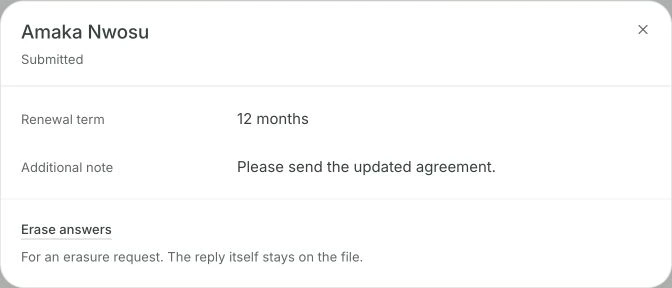
Tinye arịrịọ mbinye aka, fọm ma ọ bụ akwụkwọ n'ihe ị zigara. Onye ahụ na-emecha ya na Keepable ya; nzaghachi na-alọghachi na onye zitere ya, oge o zitere ya na arịrịọ mbụ gị n'akụkụ ya.
Ihu nzaghachi Workspace n’ezie. Arịrịọ a chepụtara na azịza atụ.Hụ ihu dum
Ihe ị na-eme na ya
Rịọ otu ugboro, ọ rute onye ọ bụla
Otu arịrịọ ahụ nwere ike ịgara otu onye ahịa ma ọ bụ otu puku na narị anọ; nke ọ bụla na-aga onye a nyochara, ọ bụghị naanị mgbasa nye ndepụta. Onye ọ bụla na-emecha ya na Keepable ma zighachi nzaghachi site n'otu ndekọ ahụ.
Ị nweta faịlụ ndị ị nwere ike ịhụ akụkọ ha
Mgbe onye ahịa zighachiri akwụkwọ Keepable bugara ya na mbụ, ndekọ ebe o si bịa na-eso ya. Ị na-ahụ nkwupụta ego nke ụlọ akụ n'onwe ya, ọ bụghị foto ihuenyo ya.
Hụ ndị na-azabeghị n'ajụghị ha
Ndị na-azabeghị dị na ndepụta, ọ bụghị amụma. Zigara naanị ha ncheta, ọ bụghị onye ọ bụla; nke ahụ na-egbochi ncheta ịbụ nsogbu.
Akwụkwọ ị na-arịọ onye ahịa na-adịkarị na Keepable ya ugbua.
Ihe ị nwere ike ịrịọ
Ụdị ajụjụ asaa, gụnyere ibulite faịlụ, yana mbinye aka n'akwụkwọ ahụ n'onwe ya.
Ihe na-alọghachi
Nzaghachi na faịlụ, a kara akara, ya na oge e zigara ha.
Ihe ị nwere ike ịhụ
Onye zara, onye na-azabeghị, na oge nzaghachi ọ bụla bịara.
Ajụjụ na azịza
Kedu ụdị ajụjụ fọm nwere ike ịjụ?
Asaa: azịza dị mkpụmkpụ, ogologo azịza, họrọ otu, họrọ ọtụtụ, nọmba, ụbọchị na ibulite faịlụ. Ajụjụ ịhọrọ nwere ike ịgbanwe ajụjụ ndị fọdụrụ ka onye na-akwụ ụgwọ ụlọ ghara ịza gbasara ego mgbazinye ịzụ ụlọ. Ajụjụ ibulite na-ebu ntụziaka gị, dịka “nkwupụta ego ọnwa isii gara aga” kama “tinye faịlụ” naanị.
Kedu faịlụ ha nwere ike ibulite, oleekwa oke ha?
PDF, JPEG, PNG ma ọ bụ GIF, ruo 20 MB nke ọ bụla; ị nwere ike ịhọrọ naanị otu ụdị. Otu fọm nwere ike ịnwe naanị ajụjụ ibulite ise kacha. Anyị tinyere oke ahụ n'ihi na ihe karịrị ya na-aghọ ngwa arịrịọ zuru ezu; ọ ka mma ikewa ya n'arịrịọ dị iche iche.
Gịnị ma ọ bụrụ na m ga-anakọta NIN, BVN ma ọ bụ nọmba akaụntụ?
Kaa ụdị ozi dị nro ajụjụ ahụ nwere, usoro ijikwa ya ga-esokwa. A na-echekwa ya n'ụdị zoro ezo, ewepụ ya na ndeksi ọchụchọ, kpuchie akụkụ ya ebe ọ bụla e gosiri ya, ma ghara itinye ya na mbupụ belụsọ onye nwere ikike rịọrọ ya; a na-edekọkwa arịrịọ ahụ.
Olee otú m ga-esi tinye nzaghachi n'usoro nke m?
CSV, otu ahịrị maka onye ọ bụla, na-ebido n'onye ahụ wee soro akara ntụaka gị maka ya, ka ọ jikọta na ndekọ onye ahịa i nwere. Faịlụ na-abịa dịka njirimara ị ji ebute ha, ọ bụghị ihe etinyere n'ime tebụl.
Olee otú m ga-esi mara na nkwupụta ego ha zigara bụ ezigbo ya?
Ọ bụrụ na o sitere na Keepable na mbụ, ọ ka nwere akara ụlọ ọrụ wepụtara ya, akara ahụ na-esokwa ya ruo gị. Ọ bụrụ na onye ahịa bulitere ya n'onwe ya, ị nwere ike igosi na ọ bulitere kpọmkwem faịlụ ahụ n'oge ahụ, mana ọ bụghị ebe faịlụ ahụ si bịa. A na-enye ha akara dị iche ka ị mata nke ị nwere.
Olee otú m ga-esi soro ndị na-azabeghị?
Ndị na-azabeghị dị na ndepụta na aha ha, ọ bụghị ọnụọgụ ị na-eche. Zigara ndị ahụ ncheta, ọ bụghị puku otu na narị anọ niile.
Oke ya
Ọ bụ arịrịọ. Keepable anaghị amanye mmadụ ịza, ma ọ bụ nyochaa ihe dị na nzaghachi ya. Ọ bụrụ na onye ahịa bulitere nkwupụta ụlọ akụ, anyị nwere ike igosi faịlụ o bulitere na oge ya, ọ bụghị na ego e dere na ya bụ eziokwu. Akwụkwọ si na Keepable na mbụ dị iche, ị ga-ahụkwa ọdịiche ahụ.
 Keepable